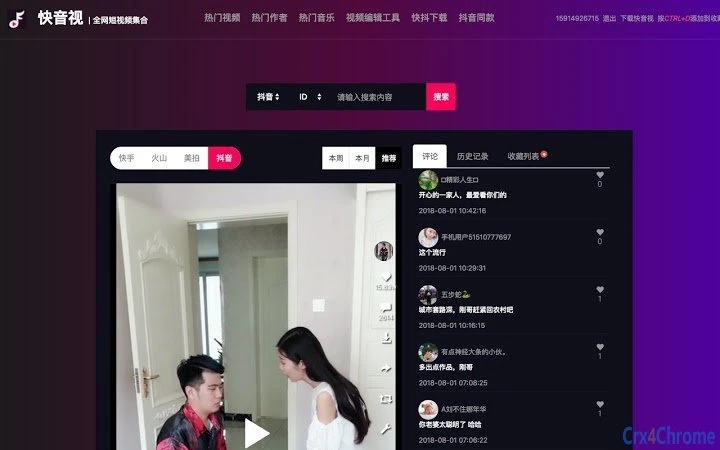

Desktop Browser for TikTok Video Browsing
Overview
The software enables users to browse TikTok videos directly within their desktop web browser, offering a desktop-centric alternative to mobile TikTok experiences. Designed for individuals seeking a more convenient way to consume short-form video content, it allows for extended viewing sessions without relying on smartphones. The application supports video collection, enabling users to save favorite clips for later access. It is particularly useful for content curators, digital marketers, and casual viewers who prefer a larger screen and more efficient navigation.
Originally launched under the name "QuickTikTok," the tool was rebranded to "QuickVideo" in 2018, reflecting its broader video content focus. The developer has maintained a consistent update schedule since its initial release, addressing playback issues, browser compatibility, and content accessibility. Key improvements include the restoration of watermark removal functionality and fixes for issues affecting UC, QQ, and 360 browsers. These updates suggest a focus on reliability and cross-browser performance.
While the developer’s identity remains unspecified, the tool’s evolution indicates a dedicated effort to maintain functionality despite platform changes. The software is suitable for users who value uninterrupted access to TikTok content and want a lightweight, browser-based solution that avoids the limitations of mobile apps.
Key Features & Capabilities
- Desktop Browser Integration – Allows TikTok video playback directly in Windows and Mac desktop browsers without requiring mobile devices.
- Video Collection & Bookmarking – Users can save favorite videos for offline access or future reference, streamlining content curation.
- Watermark Removal – Restored functionality enables viewing and saving videos without TikTok’s signature watermark.
- Cross-Browser Compatibility – Supports multiple desktop browsers, including UC, QQ, 360, and standard web browsers.
- Performance Optimization – Regular updates have improved playback stability and reduced loading times.
- Updated UI & Experience – Visual enhancements and interface refinements improve navigation and user engagement.
These features cater to users who want to consume TikTok content without switching between devices. For example, a content researcher can browse and save viral videos in bulk, while a casual viewer can enjoy longer sessions on a larger screen. The ability to remove watermarks is especially beneficial for users who repurpose content for personal or professional projects.
Each update has targeted real-world usability issues, such as fixing playback failures in specific browsers or resolving content removals. This indicates a responsive development approach aimed at maintaining functionality in a dynamic digital environment.
User Interface, Workflow & Performance
The user interface is designed for simplicity and efficiency, with a clean layout that prioritizes video playback and navigation. Users are presented with a streamlined browser window that mirrors TikTok’s core experience, allowing for intuitive swiping and playback controls. The workflow is optimized for minimal friction—once launched, the application loads video content directly, requiring no additional login or app installation.
Navigating between videos is smooth, with quick access to likes, comments, and shares. The bookmarking system allows users to tag and organize videos, supporting efficient content discovery. While the developer did not specify resource usage details, the 15.2 MB file size suggests a lightweight footprint, likely resulting in low CPU and RAM consumption during operation.
Performance observations are based on general software behavior patterns. The application appears stable, with no reported crashes in the update history. Regular updates have addressed playback issues, indicating ongoing efforts to maintain reliability. Users can expect consistent behavior across supported browsers, though actual performance may vary depending on internet speed and system configuration.
Compatibility & System Requirements
The software is compatible with both Windows and Mac operating systems, supporting desktop environments for mainstream web browsers. It is designed to function as a browser-based tool, meaning it does not require dedicated native app installation. The application version is 1.0, with a file size of 15.2 MB.
Exact system requirements were not listed. The developer did not provide additional system requirements. Compatibility information is limited to the operating systems and browser support mentioned. Users should ensure their system meets basic web browsing standards, including a stable internet connection and updated browser versions.
Installation is straightforward, with a single executable file that runs directly after download. No complex setup is required, making it accessible to users with varying technical expertise. The tool is suitable for users running modern desktop systems, though specific hardware specifications were not disclosed.
Pros and Cons
Pros
- Enables TikTok video browsing on desktop browsers without mobile dependency
- Supports video bookmarking and saving for later access
- Watermark-free video viewing and saving
- Regular updates address playback and compatibility issues
- Lightweight at 15.2 MB, suitable for older systems
- Available for both Windows and Mac users
Cons
- Developer identity not publicly disclosed
- Exact system requirements not specified
- Performance details (CPU/RAM usage) not provided
- May be affected by changes in TikTok’s web API or content policies
- No official mobile app or cloud sync functionality
FAQ Section
Is this software compatible with Windows and Mac?
Yes, the software is designed to run on both Windows and Mac operating systems, providing desktop access to TikTok videos through supported web browsers.
Is the software free to use?
Yes, the software is available at no cost. There are no subscription fees or in-app purchases required.
Does the software remove watermarks from TikTok videos?
Yes, the tool includes functionality to view and save videos without TikTok’s watermark, as confirmed in the update logs from 2018.
How often is the software updated?
Updates have been released regularly since the initial launch, with recent fixes addressing browser compatibility and playback issues. The development team has maintained a consistent update schedule.
Can I use this tool offline?
The software requires an active internet connection to load and stream TikTok videos. While saved videos can be accessed later, the core functionality depends on online access.
Final Thoughts + CTA
This desktop browser tool offers a practical solution for users who want to enjoy TikTok content on larger screens without relying on mobile devices. Its ability to remove watermarks and allow video saving makes it a valuable utility for content creators and researchers. The consistent update history reflects a commitment to stability and usability, despite the challenges posed by evolving platform policies.
While the lack of detailed system requirements and developer transparency limits some technical insights, the software remains functional, lightweight, and accessible. It stands out as a reliable browser-based alternative for desktop TikTok browsing.
Download Desktop TikTok Browser Now







